Developers
Self-hosting
The whole core is AGPL-3.0 and runs on your own infrastructure: one Postgres database, Redis, an S3-compatible object store, plus the web and worker processes. Docker Compose wires all of that together.
What you run
Self-hosting gives you the entire AGPL-3.0 core with no seat quota: ticketing, the email channel, automations, SLA and CSAT, the knowledge base and customer portal, reports, and multi-tenant workspaces backed by PostgreSQL row-level security — in 25 languages. The features under ee/ (agent SSO, delegated customer-organization SSO, the advanced audit log) stay locked unless you hold a commercial licence.
Three commands
The repository root ships a production compose.yaml that builds and starts PostgreSQL 17, Redis, MinIO, the web server and the worker. A one-shot migrate service runs the database migrations, applies row-level security and — on the first start — seeds a demo workspace, before the web and worker processes come up.
git clone https://github.com/Open-HelpDesk/open-helpdesk && cd open-helpdesk
cp .env.example .env   # set BETTER_AUTH_SECRET and ENCRYPTION_KEY
docker compose up -d
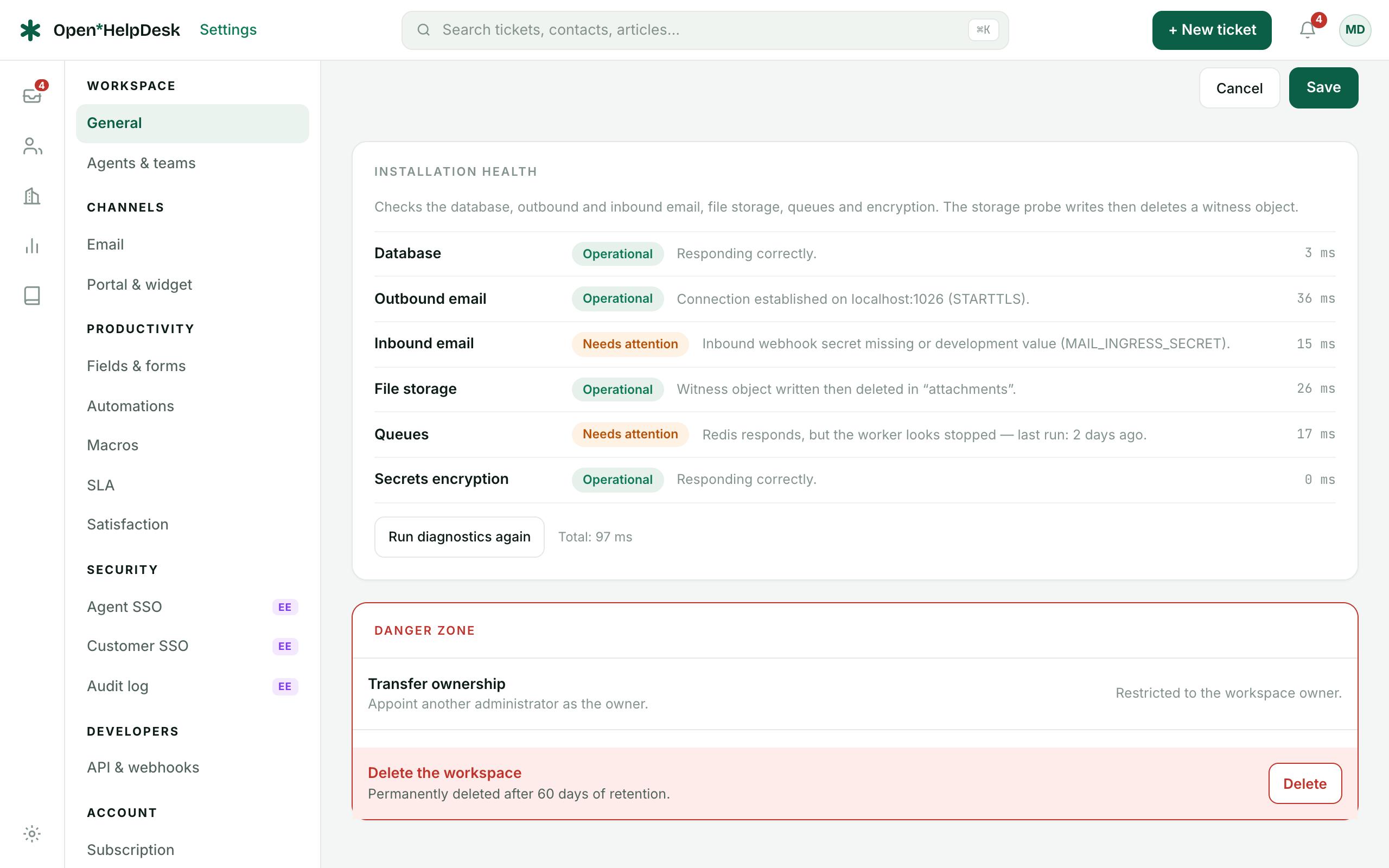
The application answers on http://localhost:3000. With the default SEED_DEMO=true it starts with the Acme demo workspace (login marie.dupont@acme.example / demo-openhelpdesk). Set SEED_DEMO=false once your own agents exist. The six-probe diagnostics card in Settings → General tells you what is still left to configure.
Running from source
To develop against the code rather than the prebuilt images, run the dependencies in Docker and the app on the host. Migrations are explicit here — there is no migrate container to run them for you:
corepack enable
pnpm install
cp .env.example .env
docker compose -f docker/docker-compose.yml up -d   # postgres, redis, minio, mailpit
pnpm db:generate && pnpm db:migrate
pnpm --filter @openhelpdesk/db db:rls
pnpm db:seed && pnpm db:seed:auth
pnpm dev
Then open http://acme.localhost:3000. Development emails are captured by Mailpit.
The variables that matter
The production compose.yaml pins the internal hosts (DATABASE_URL, REDIS_URL, S3_ENDPOINT) itself, so those take precedence over your .env. What you actually have to decide lives here:
- BASE_DOMAIN
- The domain workspaces hang off. A workspace “acme” is served at acme.$BASE_DOMAIN.
- DEFAULT_TENANT_SLUG
- Single-tenant self-hosting: the one workspace served on the bare domain, with no subdomain.
- BETTER_AUTH_SECRET
- Signs sessions and the CSAT link HMAC. Must be a strong, private value.
- ENCRYPTION_KEY
- Encrypts secrets at rest (SMTP passwords, API keys, SSO secrets). 32 random bytes: openssl rand -base64 32.
- MAIL_INGRESS_SECRET
- The shared secret guarding the inbound email endpoints.
- MAIL_FROM + SMTP_* / provider keys
- Instance-wide sending fallback, used only when a workspace has configured no provider of its own.
- S3_*
- The object store for attachments — endpoint, credentials and bucket.
- OPENHELPDESK_EDITION
- self-hosted (default) unlocks the full core; cloud defers entitlements to an external control plane.
Each workspace chooses its own email provider in Settings → Channels → Email (stored encrypted); the mail variables above only act as an instance-wide fallback. For a single workspace on a bare domain, set DEFAULT_TENANT_SLUG; leave it unset for the multi-tenant, subdomain-per-workspace default.
.env.example ships BETTER_AUTH_SECRET and ENCRYPTION_KEY at the placeholder value change-me. Never keep those defaults in production. A known auth secret lets anyone forge a session or a CSAT link; a known encryption key exposes every stored SMTP password, API key and SSO secret. And ENCRYPTION_KEY cannot be rotated casually — change it later and the secrets encrypted under the old one can no longer be decrypted. Generate strong values before the first real sign-in.Backups
Two stores hold your data and must be backed up together to stay consistent: the Postgres database and the object store where attachments live. Dump Postgres with pg_dump:
# Database
docker compose exec postgres \
  pg_dump -U openhelpdesk openhelpdesk > backup-$(date +%F).sql

# Object store (attachments) — mirror the bucket to a safe location
mc mirror local/attachments ./attachments-backup
Restore is the reverse: psql the dump back into an empty database and mirror the attachments back into the bucket. Always snapshot both before an update.
Updates
Pull the new code, rebuild the images and bring the stack back up. The migrate service runs any pending migrations and re-applies row-level security automatically before web and worker restart, so there is no separate migration step for the Compose flow:
git pull
docker compose build
docker compose up -d
On a from-source install, run pnpm db:migrate (and pnpm --filter @openhelpdesk/db db:rls) yourself after pulling. While the product is in alpha, read the release notes and take a backup first.
Licensing
The licence boundary is the ee/ directory. Everything outside it is AGPL-3.0: you may run and modify it freely, but the AGPL requires you to offer your users the corresponding source if you run a modified version as a network service.
The ee/ directory — agent SAML/SCIM SSO, delegated SSO for customer organizations and the advanced audit log — is under a separate commercial licence. Its source is visible and free to use in development and testing, but production use requires a commercial agreement. The self-hosted edition unlocks the full core with unlimited seats and leaves those ee/ features locked. The integration surface available today is described on the API & webhooks page.